Developer Documentation
This documentation is for engineers, technical partners, and self-host operators working directly from the validibot repository. If you're looking for day-to-day product usage guidance, see the User Guide instead.
Deployment pages in this repo are customer-facing for self-hosted installs. Hosted-cloud operator workflows belong in the private internal docs, not here.
Getting Started
New to the codebase? Start here:
- Platform Overview — What Validibot is and the problems it solves
- How It Works — Technical walkthrough of the validation lifecycle
- Quick Reference — Core concepts and basic usage patterns
- Run Validibot Locally — First-time local setup for self-hosting and evaluation
Architecture
How the pieces fit together — this is the canonical project-shape diagram (the README and the cloud repo's docs point here rather than drawing their own):
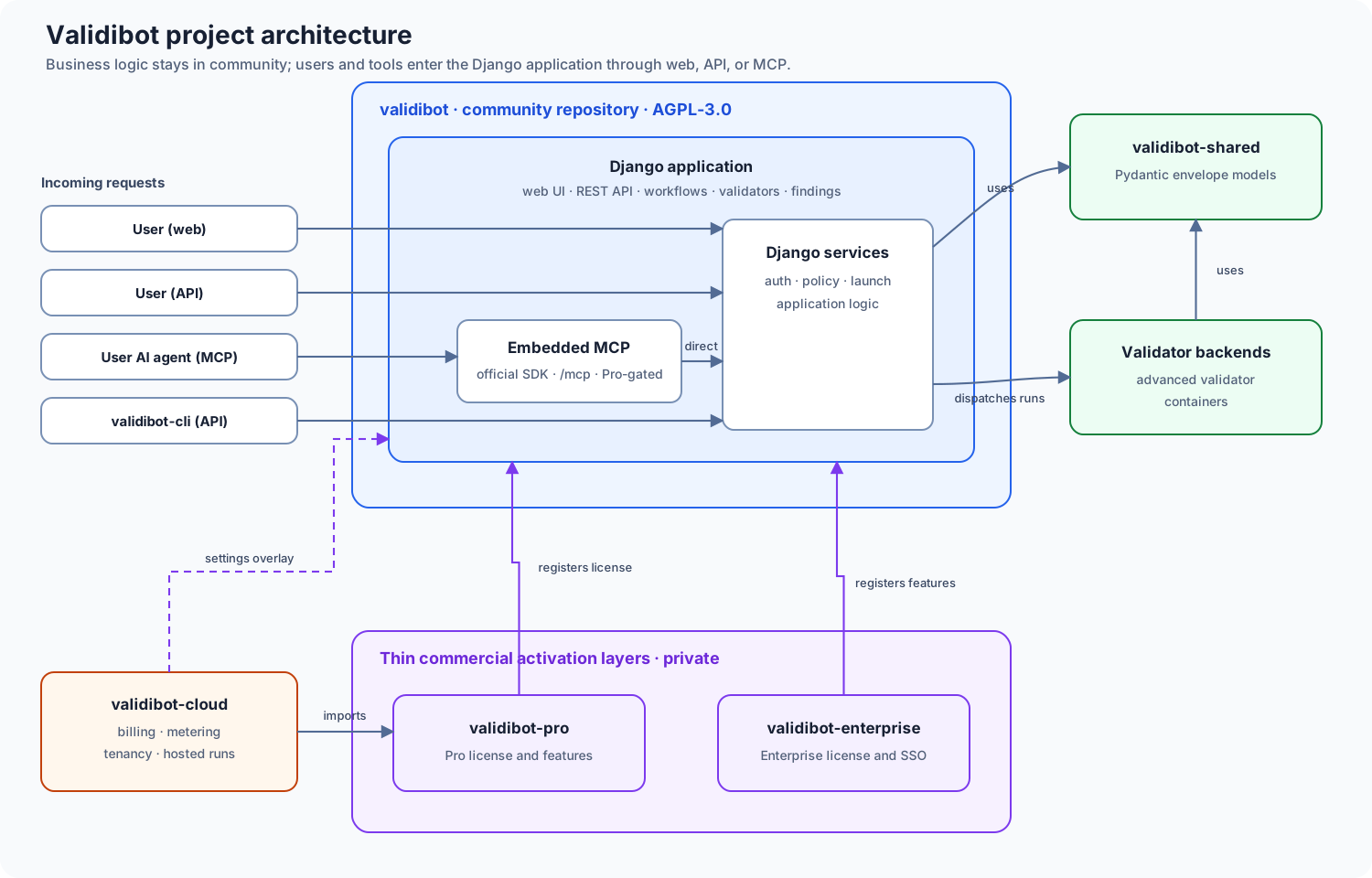
The rule of thumb behind the shape: business logic lives in community,
gated by feature flags; validibot-pro/-enterprise are thin activation
layers; validibot-cloud adds hosting-only concerns on top. See
Commercial Extensions for the details.
Understand how the system is built:
- Terminology — Canonical glossary: validator, simple validator, advanced validator, validator backend, execution backend, validator runner, plus trust and versioning vocabulary
- Trust Architecture — The four trust invariants (caller, contract, isolation, evidence), threat model, and how the platform enforces them across web/API/CLI/MCP/x402
- Evidence Bundles — Manifest schema, retention policy, signed-credential link, export UX
- Workflow Engine — How ValidationRunService orchestrates steps
- Step Processor — The processor pattern for validator execution
- Plugin Architecture — The shared registration and sync model for validators and actions
- Validator Architecture — The container interface for advanced validators, run-scoped isolation, sentinel run-completion contract
- Execution Backends — How dispatch to Docker vs Cloud Run is selected
- Submission Modes — How API payload shapes are detected
- Settings Reference — Environment variables and feature flags
- Dashboard — Architecture and extension points for the dashboard module
- Commercial Extensions — How Pro and Enterprise packages plug in
How-To Guides
Step-by-step instructions for common tasks:
- Using a Workflow via the API — Submit data programmatically
- Author Workflow Steps — Configure validation steps in the UI
- Configure Storage — Set up file storage backends
- Configure Scheduled Tasks — Set up background jobs
- Add a Form — Django Crispy Forms patterns
- Configure MFA — Multi-factor authentication settings and extension points
- Extend the Audit Log — Add new action codes, extend the field whitelist, capture new models
- Manage Organizations & Projects — Admin workflows
Data Model
The entities that make up Validibot:
- Data Model Overview — Core entities and relationships
- Projects — Organization-scoped namespaces
- Submissions — Content being validated
- Runs — Validation execution tracking
- Steps — Individual validation operations
- Validators — Validator catalogs, versions, providers, and resources
- PDF Package Validator — Fixed static-text policy, allowed package routes, exact selectors, typed artifacts, and backend limits
- Workflow Data Architecture — Scope, provenance, namespaces, signals, step I/O, and artifact boundaries
- Workflow Signals and Step I/O Reference — Detailed models, constraints, resolution, and runtime behavior
- Step I/O Tutorial — End-to-end walkthrough of I/O contracts, bindings, promotions, derivations, and runtime traces
- Results — Findings, artifacts, and summaries
- Workflow Versioning — The trust contract: contract fields, validator semantic digests, ruleset/resource immutability, the
audit_workflow_versionscommand, evidence manifests - Users & Roles — Organization membership
- Deletions — How deletions are managed
Deployment
Deploy Validibot to production:
- Deployment Overview — Choose the right deployment target (the three targets: local, self-hosted, GCP)
- Run Validibot Locally — Quickest path to a running app
- Deploy with Docker Compose — Single-host self-hosting (developer-facing reference)
- Deploy to GCP — Managed cloud deployment on Google Cloud (
just gcp deploy-allcovers web, worker, scheduler, and optionally MCP) - Deploy to AWS — Current status and interim guidance
- Google Cloud Run Deep Dive — Full Cloud Run runbook
- Docker Compose Responsibility — Operator responsibilities for self-hosting
- Scheduled Jobs (GCP) — Cloud Scheduler setup
- Scheduled Tasks (Docker Compose) — Celery + Celery Beat
- Important Notes — Common deployment gotchas
Self-hosting (operator-facing)
The customer-facing self-hosting docs live outside this dev-docs site at
docs/operations/self-hosting/. They're written for someone running their own
Validibot install on their own VM, not for someone hacking on the codebase:
- Self-Hosting Overview — three deployment targets, what's on the VM, recommended sizing, telemetry posture
- Install — substrate-generic install on any Linux + Docker host
- Configuration — env file reference, deployment profiles, settings module switching
- Backups and Restore — application-level backup/restore with manifests and restore drills
- Upgrades — versioned upgrade lifecycle with idempotent retry
- Validator Images — what's installed, run-scoped isolation, image pinning
- Security Hardening — recommended hardening checklist
- Support Bundle — what's redacted, support workflow contract
- Troubleshooting — common issues
- Release Notes Policy — what every release announces
- Operator Recipes — full
just self-hostedreference - Doctor Check IDs — every check ID and its fix
- DigitalOcean Provider Tutorial — first-supported VM provider tutorial
Integrations
- MCP Server — Official-SDK Streamable HTTP endpoint embedded in Django ASGI; public Community implementation activated by the Pro feature gate.
Testing
Run the test suite with uv run --group dev pytest. Integration and E2E tests
have their own just recipes.
See Testing Overview for the full testing strategy, including when to use each test layer and detailed guides for integration, stress, and EnergyPlus E2E tests.